System online // Operations & AI automation specialist
Human insight. Machine precision.
I turn operational friction into reliable systems: organised data, documented processes and connected business tools, with AI agents and automation doing the repetitive work.
The business moves. Everything still waits on you.
Every approval, every handoff, every process that only lives in your head. It works until you step away.
01 // Capabilities
Six systems that stop the work depending on you.
Start with whichever is costing you the most hours, then connect the rest later.
-
SYS_A1
Workflow automation
The same few tasks, done by hand, every single day. I build the pipeline that does them instead, including the connections no off-the-shelf tool will make for you. Your team stops spending its week on work a system should be doing.
-
SYS_A2
AI agents & sub-agents
A chatbot answers questions. An agent does the job. I build agents that own a piece of your operation — chasing the client email nobody replied to, keeping the project board honest, answering your team's process questions in chat — and the lead agent that runs them, built around the way you already work.
-
SYS_A3
CRM & lead automation
Leads go cold while everyone is busy. I set up the follow-up that runs whether or not anyone remembers, so every lead gets worked the same way and you close more of what you already paid to get in the door.
-
SYS_A4
Data & knowledge management
Three versions of the same number and nobody sure which one is right. I build the single record everything else answers to, so your team stops rebuilding the same spreadsheet and starts trusting what it opens.
-
SYS_A5
Project & operations management
When the person who knows the process is out, the work slows to whoever can guess. I get it written down, assigned and tracked, so delivery stays the same whoever is on shift.
-
SYS_A6
Business systems support
Accounting, property, domains. The back-office tools nobody owns until they break. I keep them running and connected, so the quiet stuff never turns into your afternoon.
Built on the tools your team already opens every day.
02 // Project archive
Automation in production
Real projects for real businesses, each one cutting manual work or preventing costly mistakes.
A filled marker is a counted figure. A half marker is an estimate.
-
SYS.01
Client onboarding automation
One form sets up every system before the client closes the tab.
15–25 min
Of manual setup saved per client
estimated
- n8n
- Notion
- Drive
- Chat
- ClickUp
4
Tools set up automatically from one form
measured
0
Reference numbers anyone types to link a record
measured
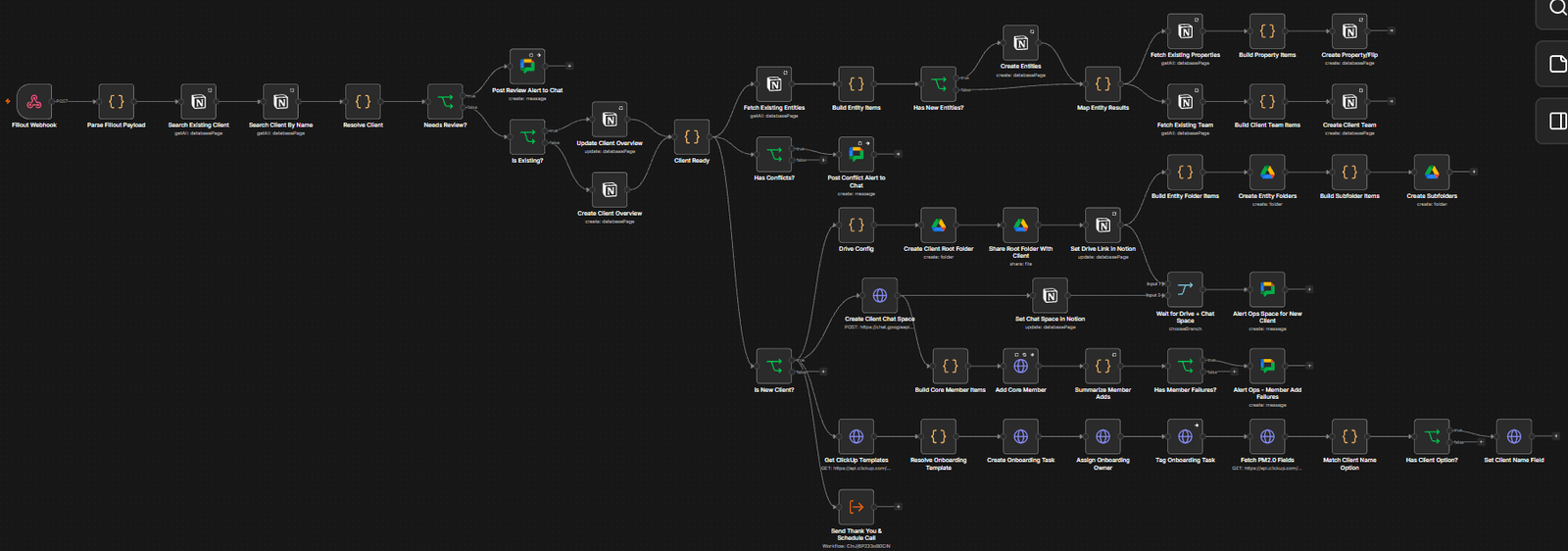
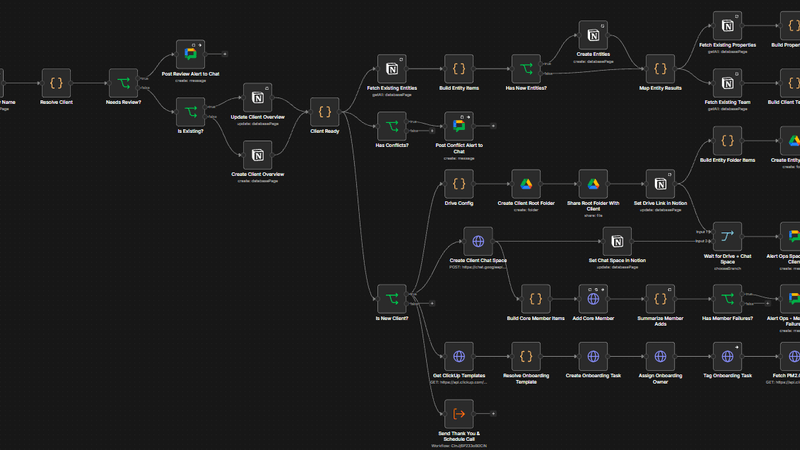
The whole automation: one form feeding the client, company and property records, Drive, Chat and ClickUp. 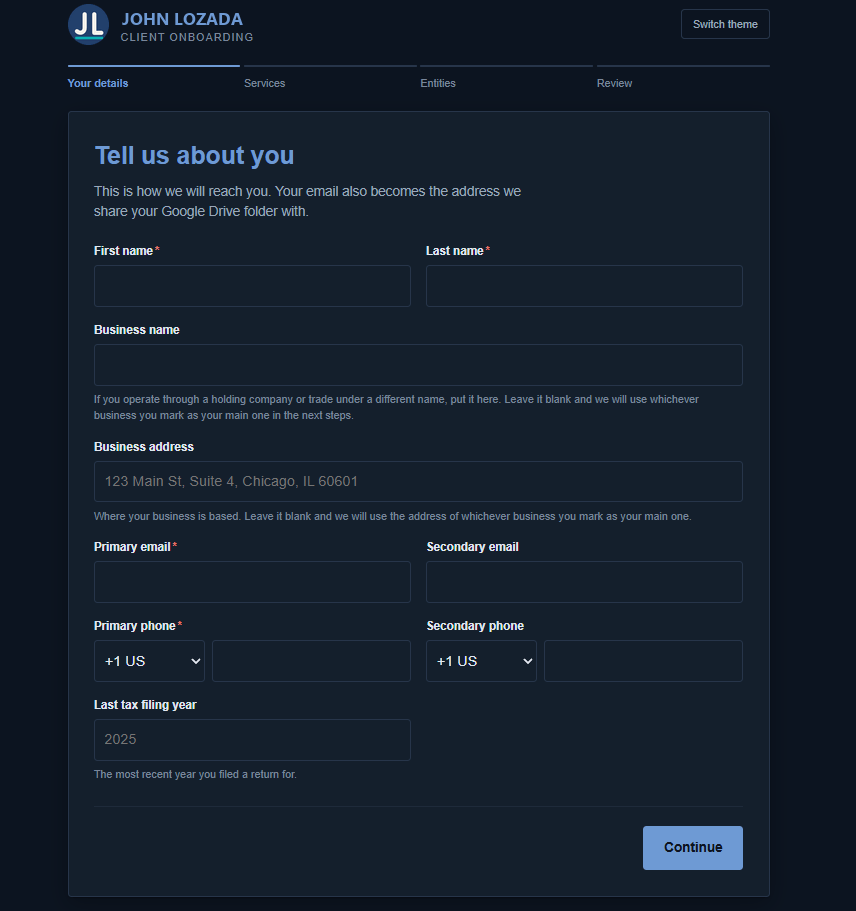
The form itself, custom-built to replace the form tool the team used before. 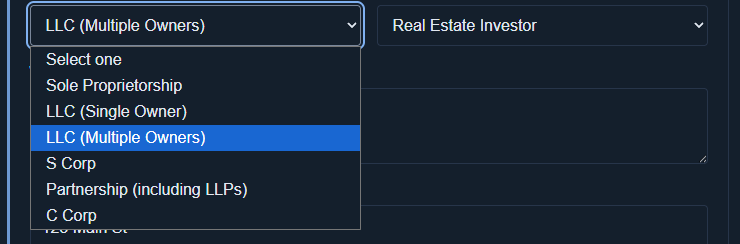
The form adapts to the answers: if a company is co-owned, it asks about the other owners. 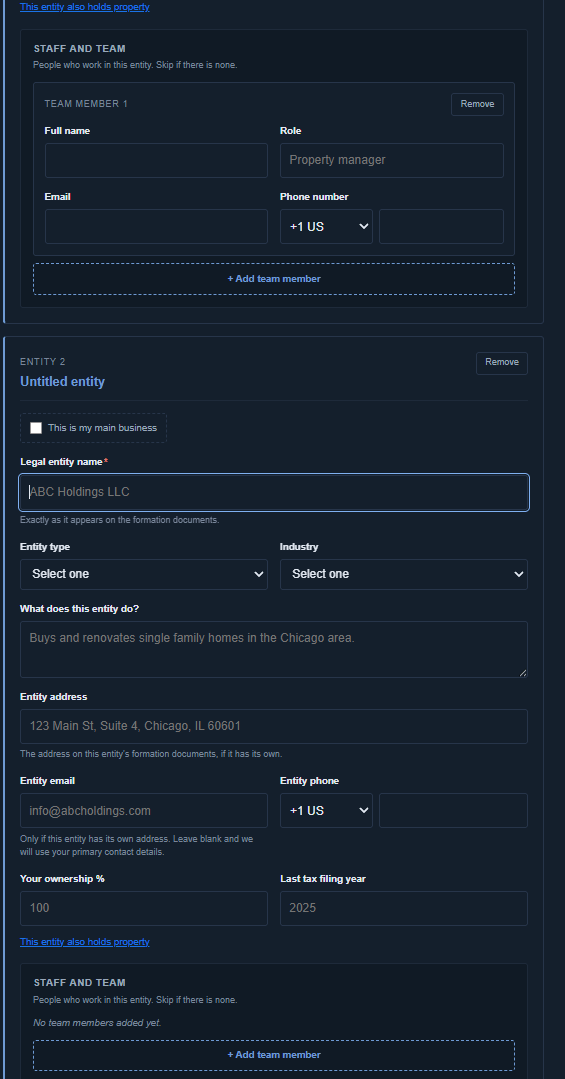
Each person is added inside the company they belong to, so nobody has to type an ID to link them. 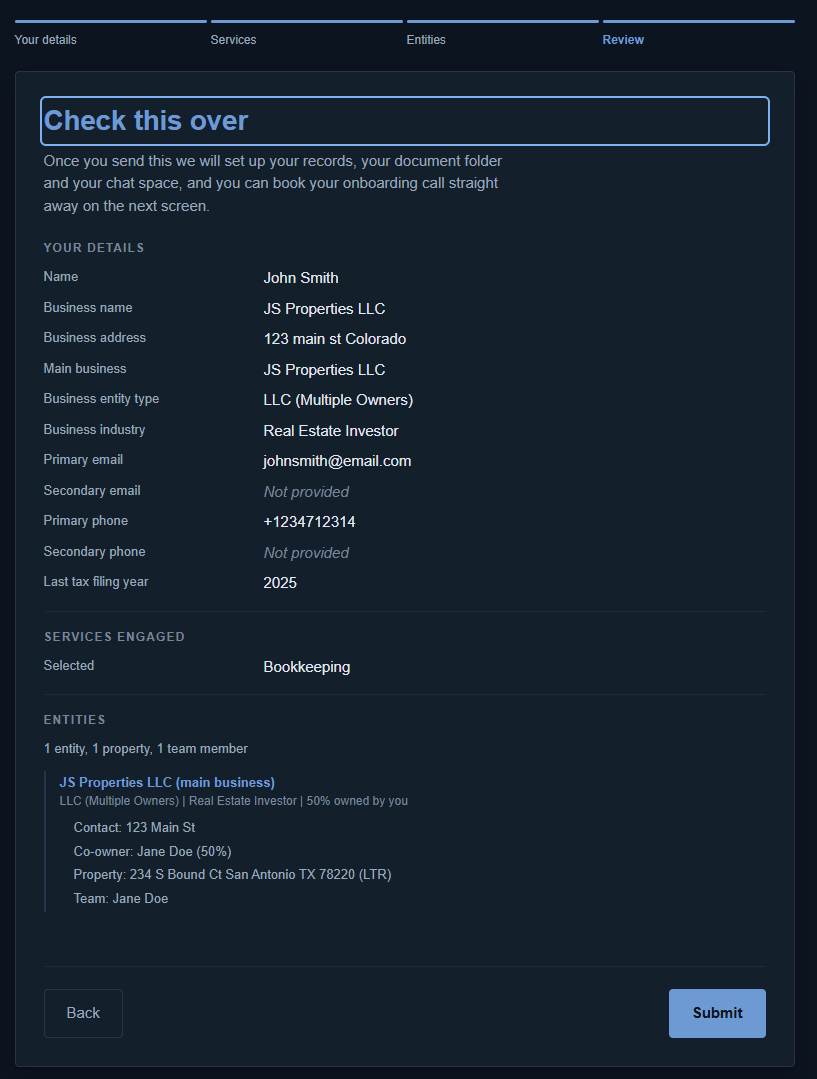
A review page shows everything before it’s sent, while fixing a mistake is still free. 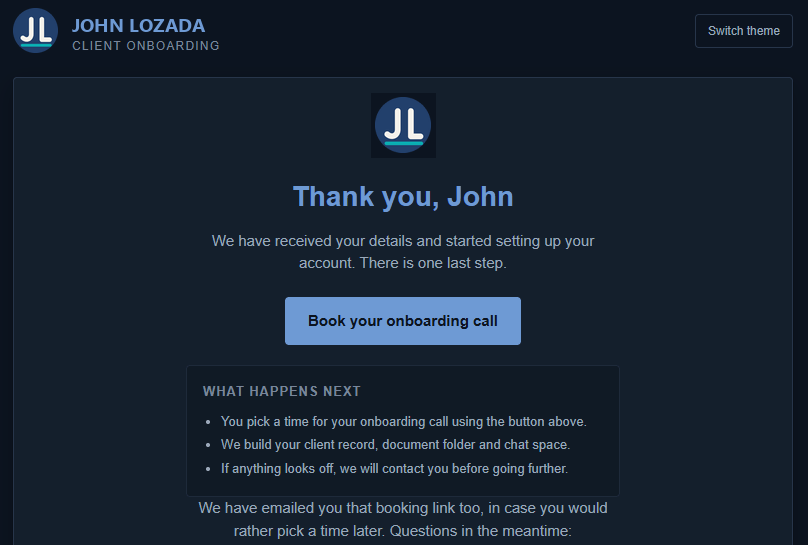
What the client sees at the end: nothing else to send, and a prompt to book their call. ProblemSetting up a new real-estate investor meant creating every record by hand: the client, their companies, their properties and their team, all linked together. One typo could file a property under the wrong company and cause a costly bookkeeping mistake months later.
SystemThe client fills in one form. It creates their records, their Drive folders, a Chat space for the team, an onboarding task in ClickUp, and a follow-up asking them to book their call.
ResultEvery client is set up the same way, from one checked source. Properties can no longer be filed under the wrong company, and each onboarding saves the team 15–25 minutes.
-
SYS.02
AI knowledge base chatbot assistant
Taking over a client means one chat message, not an hour of digging through Notion.
30–60 → 3–5 min
To get up to speed on a client when it changes hands
estimated
- Claude
- Notion
- Google Chat
- Python
- AI agent
7 → 1
Notion pages pulled into one answer, each linked to its source
measured
Up to ~55 min
Saved each time a client changes hands
estimated
0
Colleagues to chase when the client’s usual handler is on leave
estimated
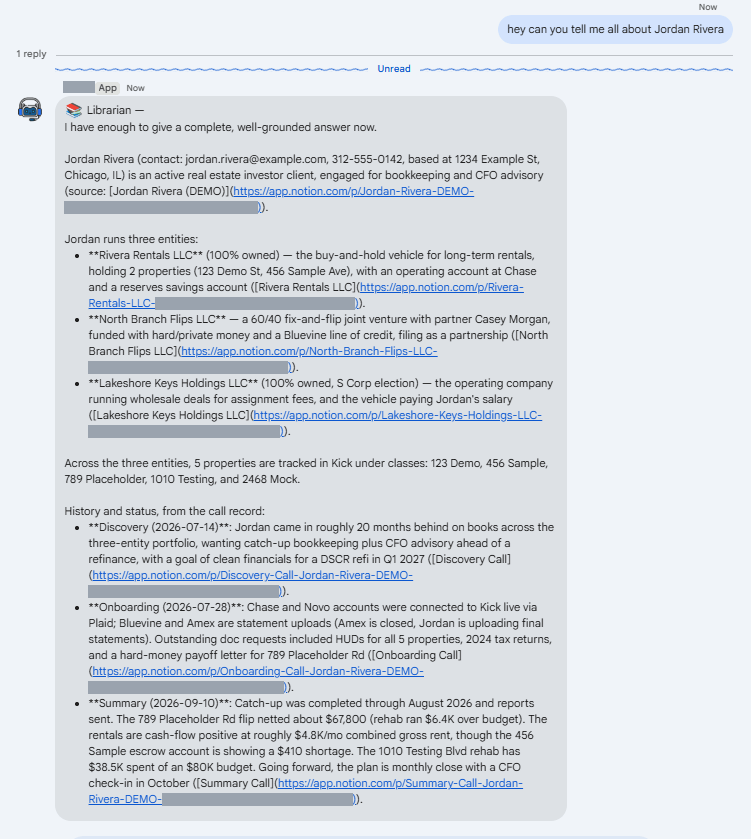
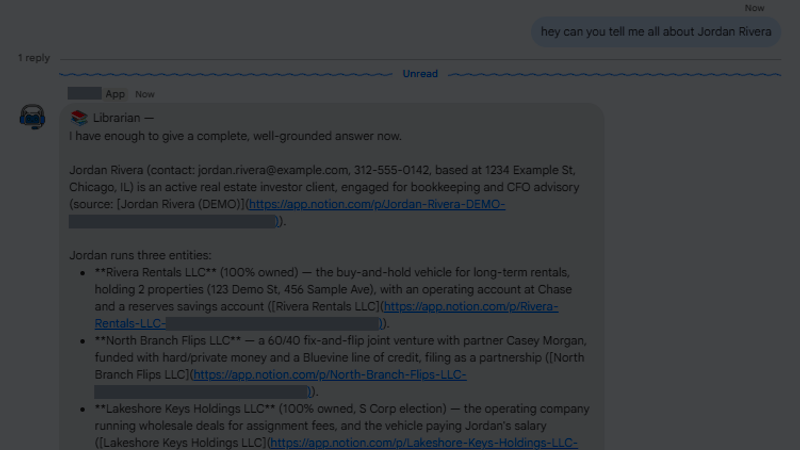
One question, the whole picture: companies, properties and call history, each linked to its Notion page. The client is a demo record. 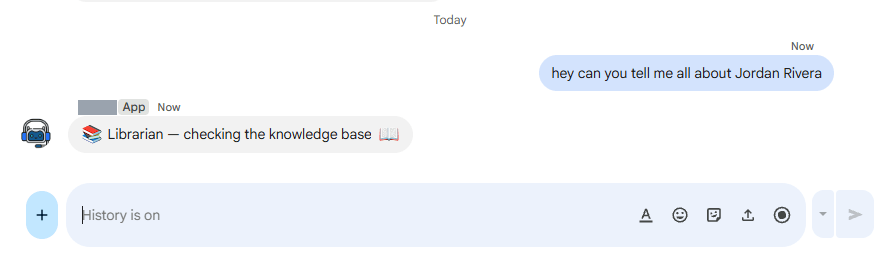
The instant reply. It lands the moment the question does, so the chat never times out while the real answer is being put together. ProblemA team of about twenty keeps everything about its clients in Notion: their companies, properties, accounts, call notes and history. Clients change hands all the time. A new client is assigned to someone, or a teammate covers a client while the person who normally handles it is on leave or out sick. Each time, the new person had to dig through Notion page by page, opening the client, then each company, each property and the call notes, before they could do any work. That took thirty minutes to an hour, or meant interrupting a colleague who might not be there to ask.
SystemAn assistant the team messages in Google Chat, in their own words: “tell me all about this client.” It replies straight away so the chat doesn’t time out, then posts the full picture in the same thread. It reads Notion live, following the links from a client to their companies, properties and call notes, the same path a person would click through, and it reads the firm’s how-to guides for “how do we…” questions. Every fact links to the page it came from. If it can’t find something it says so instead of guessing, and if a name could mean two clients it asks which. Only the company’s own Google accounts can use it, and the firm’s own books stay off-limits.
ResultPicking up a client now takes a few minutes instead of up to an hour, and nobody has to track down the person who’s away. The handoff no longer depends on who is in that day. The answer can be checked in one click, because every line links to its source. It answered 24 real questions in its first four weeks, and 21 came by direct message, so it was made direct-message only. It answers questions and doesn’t change records, on purpose.
-
SYS.03
Fathom meeting intelligence router
Every call written up, filed and turned into tasks in about fifteen seconds.
39
Meetings processed in a 14-day window — about 2.8 a day
measured
- Fathom
- AI classification
- Notion
- ClickUp
25–35 hrs
Of admin per month no longer done by hand
estimated
~15 sec
From a call ending to everything being filed and sent
estimated
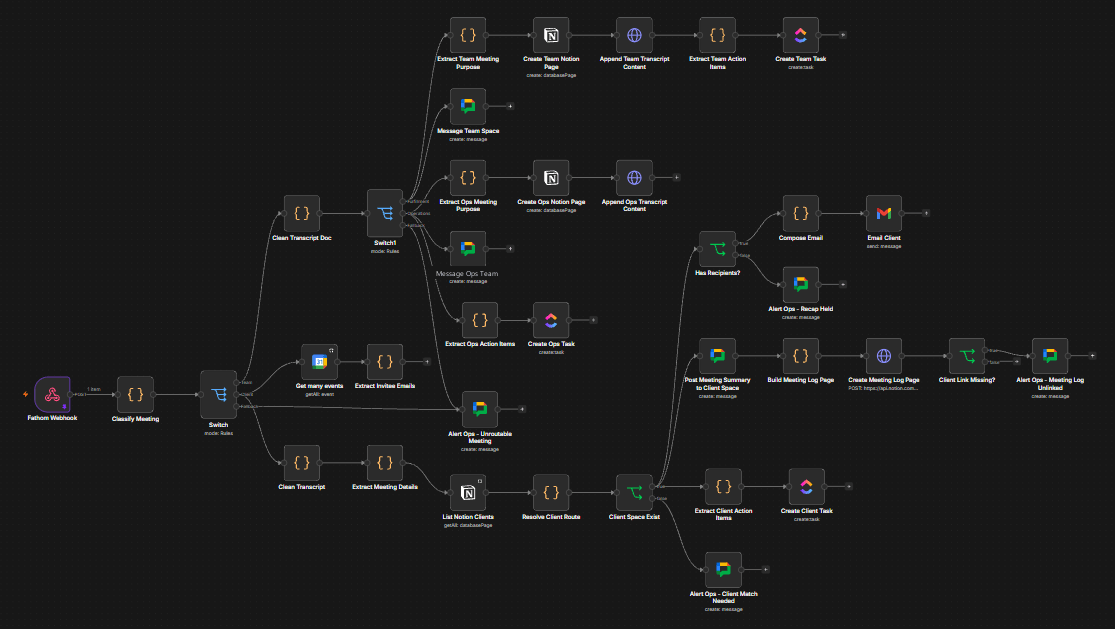
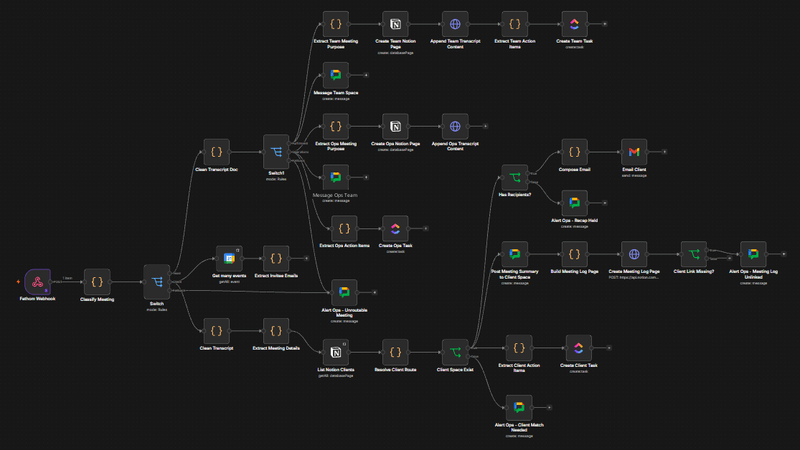
After a call, the automation splits into steps that run at the same time: sort the meeting, find the client, then send and file everything. ProblemWriting up calls was the easy part. The hard part was making sure each summary went to the right client, and never into another client’s workspace. If the system wasn’t sure, it had to stop rather than guess.
SystemAfter each call, the system looks at the meeting title, who attended, who spoke and what was said, and uses all of it to work out which client the call belongs to. Nothing is sent until it’s confident.
ResultAbout 15 seconds after a call ends, the client gets a recap email, the team gets a briefing in Chat, the notes are filed in Notion and the tasks are assigned in ClickUp. If the system isn’t sure which client it was, it sends nothing and asks a person to confirm.
-
SYS.04
Overdue invoice chaser
Overdue invoices chased politely and on schedule, stopping the moment the client pays or replies.
19 / 19
Test scenarios passing: paid, unpaid, disputed, promised, declined and failed sends
measured
- Zapier
- AI by Zapier
- Zapier Tables
- Gmail
- Slack
0
Reminders sent to a paid, voided or paused invoice in the final test run
measured
~7.5 hrs/mo
Owner time saved on chasing, at 15 overdue invoices a month
estimated
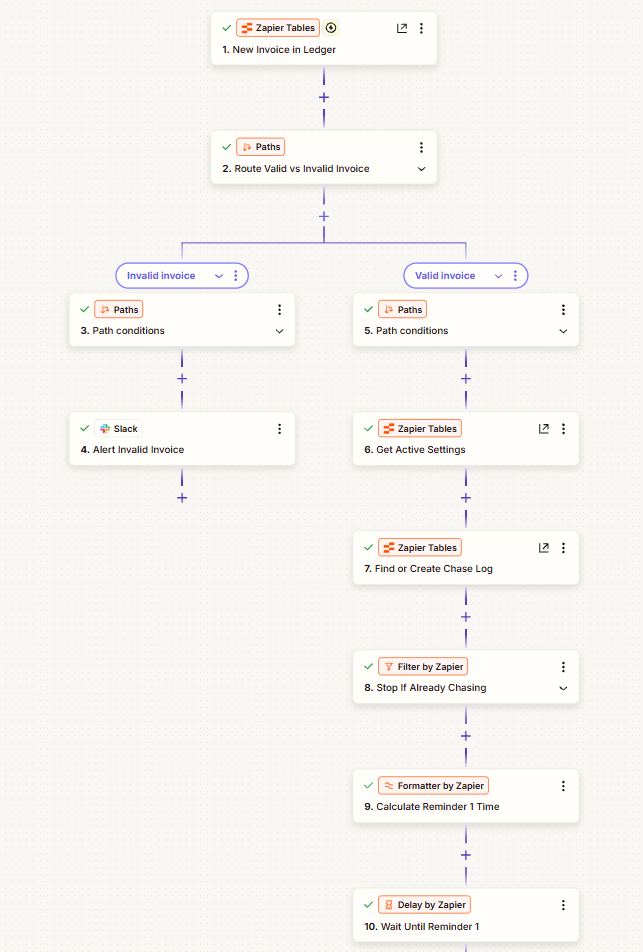
Each new invoice is checked first. One missing an email, amount or due date is flagged, not chased. 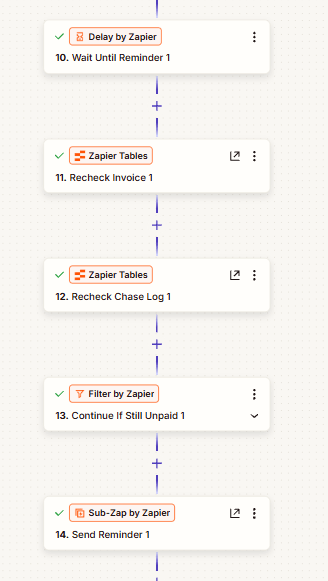
Before every reminder it re-checks the invoice, so a paid, voided or paused one is never chased. 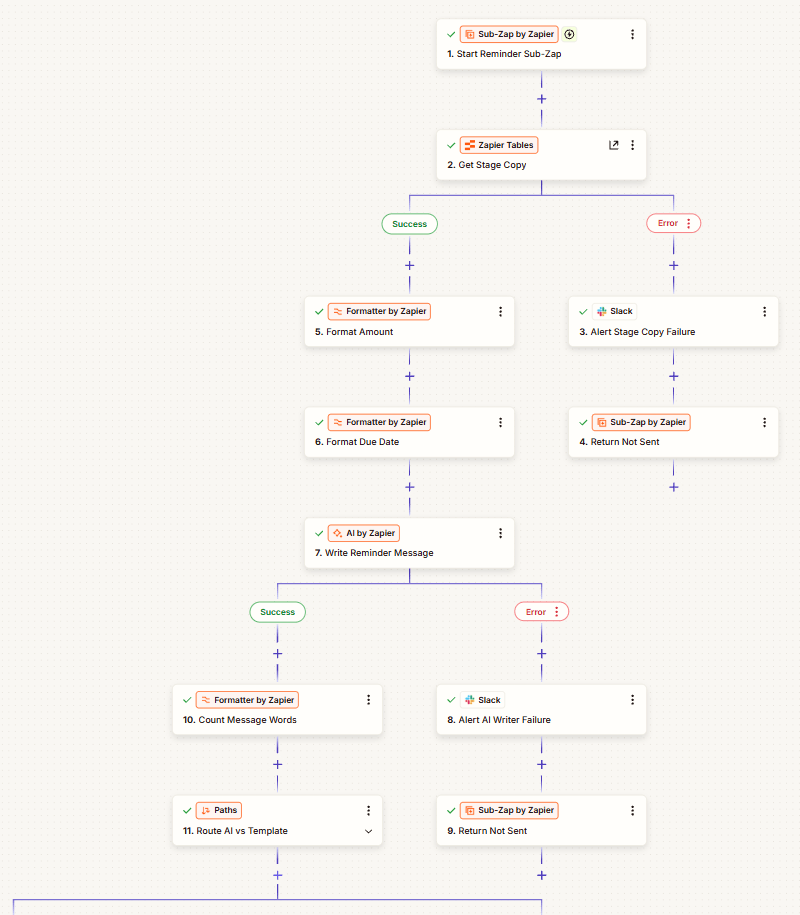
The AI writes only the greeting and a few sentences. The amount, due date and payment link come straight from the invoice. 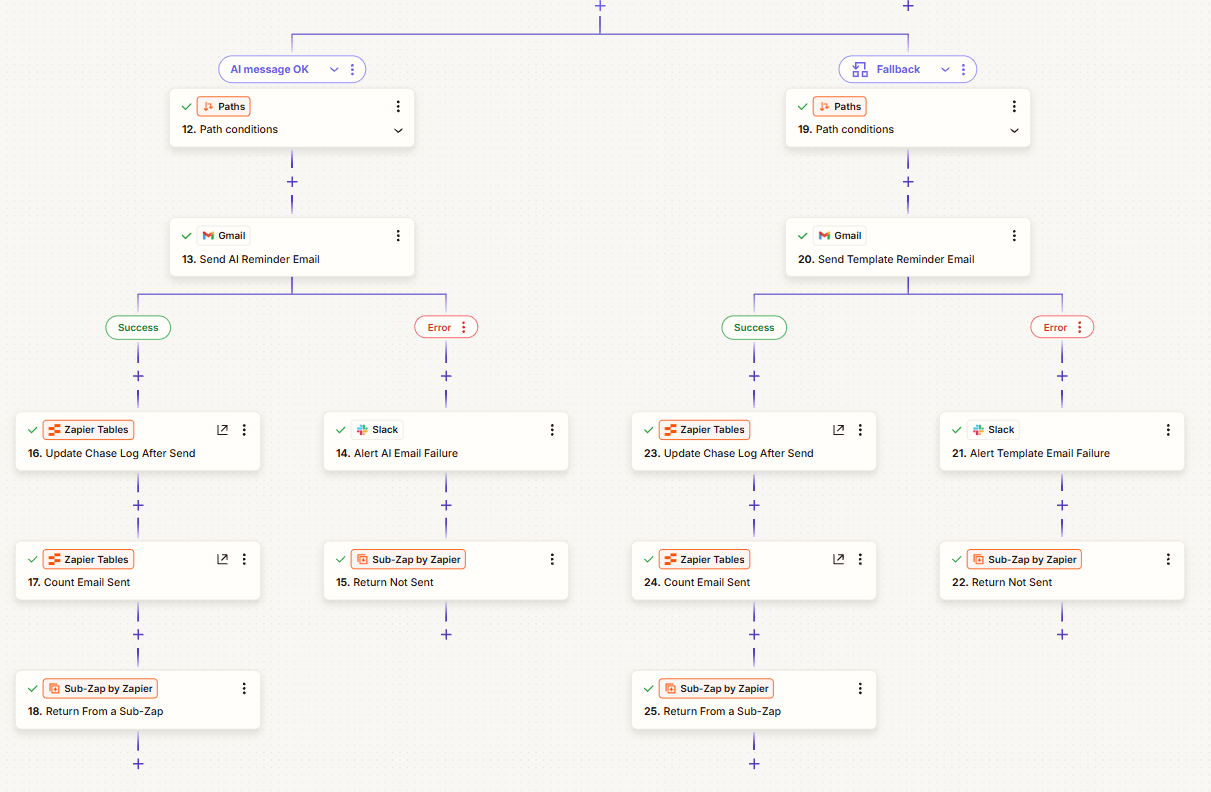
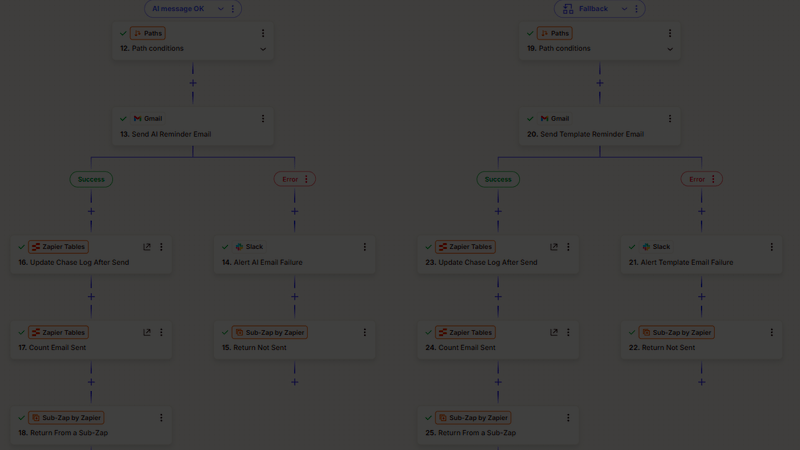
Every AI message is checked before it goes out. If it fails, a fixed template is sent instead, and a failed send alerts the owner. 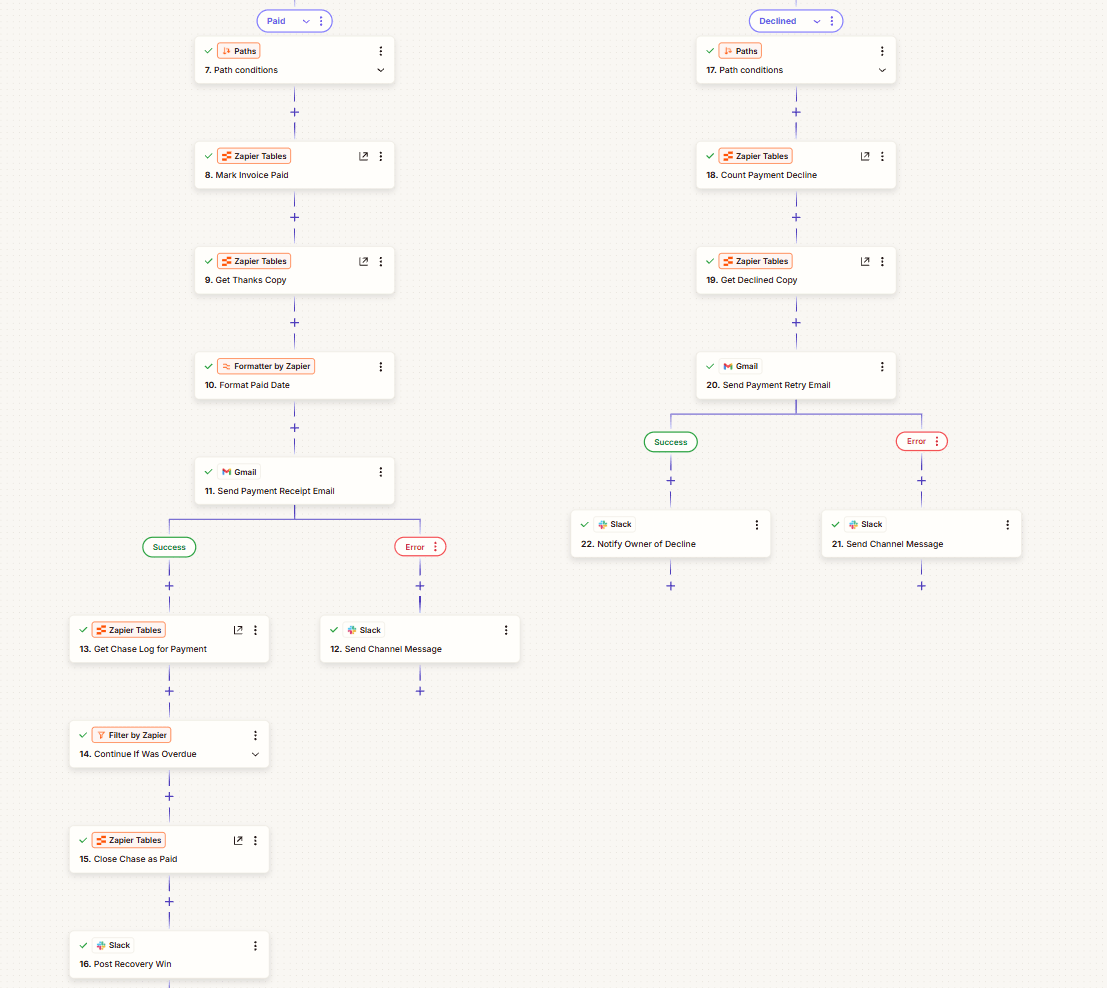
A client who pays gets a receipt. A declined card gets clear steps to try again. 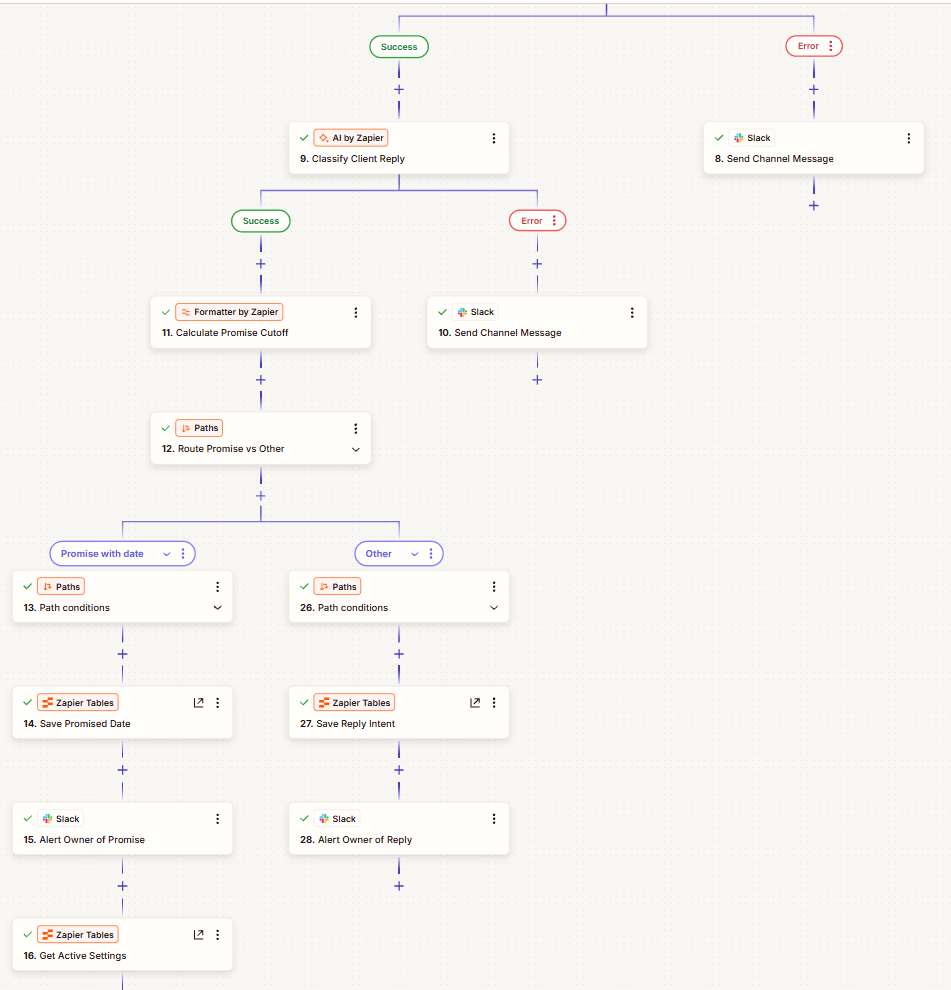
When a client replies, the chase pauses and AI works out what they said. A promised date is checked the day after. 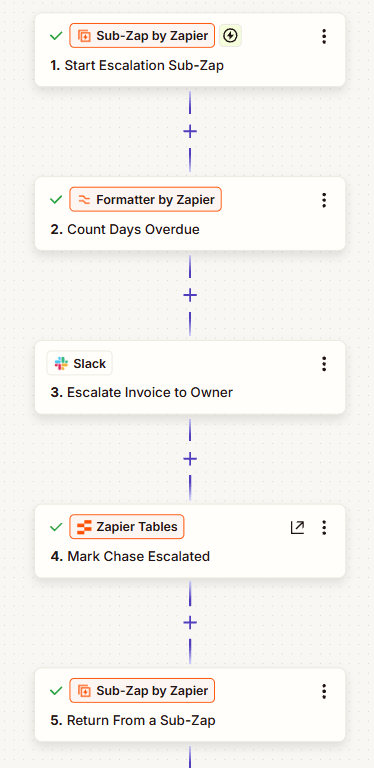
After three reminders the emails stop, and the owner gets a Slack message asking them to call. ProblemUnpaid invoices slid to 30, 60 or 90 days because chasing them meant writing an awkward email, remembering to follow up a week later and keeping track of who promised what. So it got put off, and money the business had already earned didn’t come in.
SystemA day after an invoice is due, a friendly reminder goes out, then a firmer one a week later, then an offer to split the payment. AI writes each reminder to suit the client, but the amount, due date and payment link are copied straight from the invoice. Before every email it checks again, so a paid, voided or paused invoice is never chased, and a client’s reply pauses the chase and tells the owner what they said.
ResultEvery invoice ended where it should: paid ones closed with a receipt, replies paused the chase, and unpaid ones went to the owner after three reminders with a Slack message asking them to call.
-
SYS.05
GoHighLevel account, built from empty
A complete GoHighLevel setup, from getting approved to send texts, through the funnel, to the weekly reminders that keep members turning up.
17 of 50
Free registrants who became paying VIP clients
measured
- GoHighLevel
- A2P 10DLC
- DNS
- Funnel
- Pipelines
3 weeks
Texting registration approved on the first submission
estimated
21
Automations running across the account
measured
2–3 hrs / week
Manual reminder sending saved
estimated

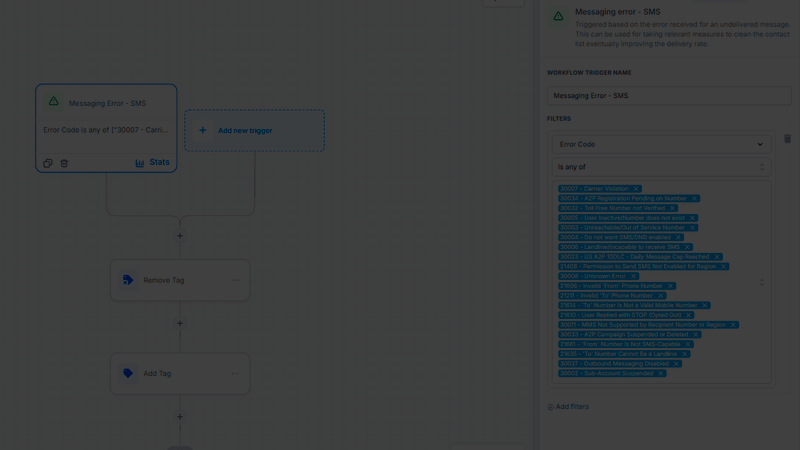
01 SetupTexting registration first, because everything else waits on it. Approved on the first try. 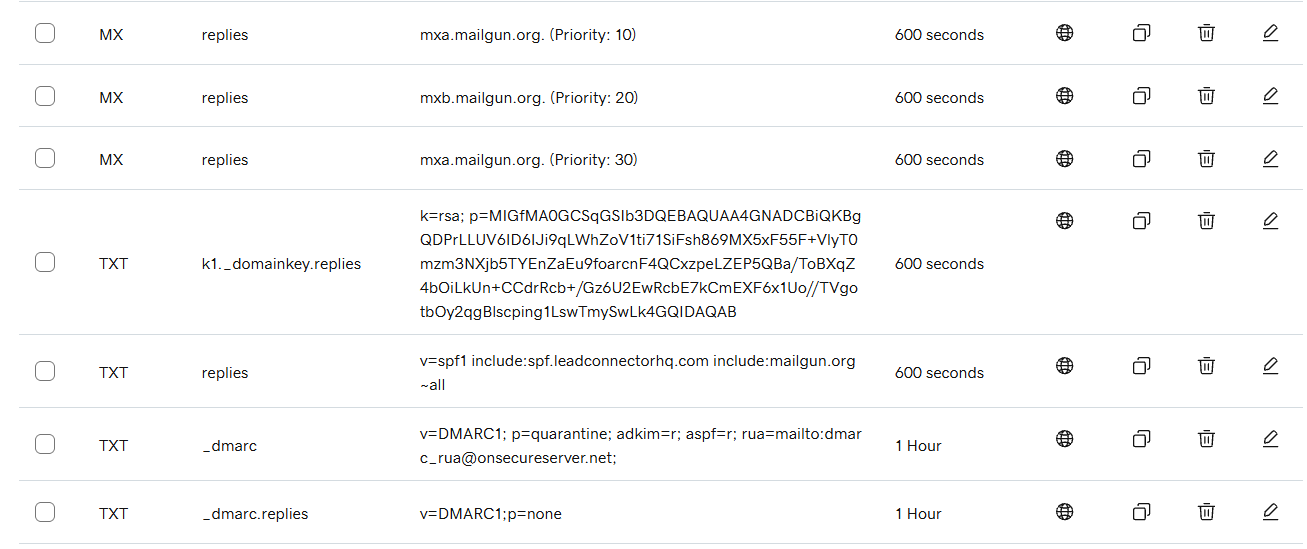
01 SetupThen the domain and the email settings that prove messages are genuine, so they land in inboxes, not spam. 
01 SetupThen the CRM: four stages, from free sign-up to ready for the call. Thirty-three people in the first stage, seventeen in the last. Names and values hidden. 
02 FunnelOnly then the funnel: the page most people think of as the whole project. 
02 FunnelThen the upsell, shown before sign-up finishes: a paid ticket offered to someone who has just said yes to the free one. 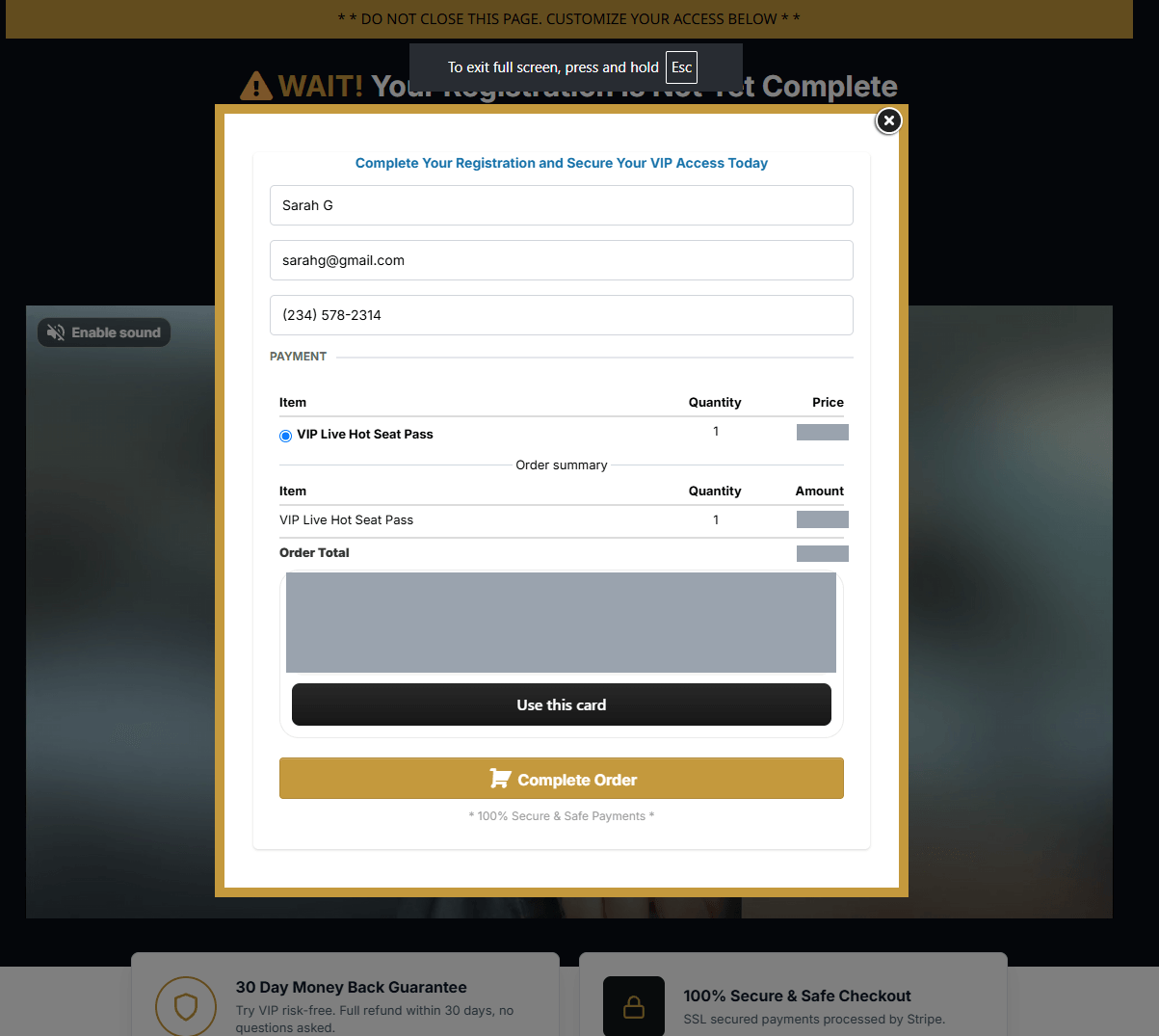
02 FunnelThe checkout. A completed payment is what sets off the paid-ticket automations later on. Card details hidden. 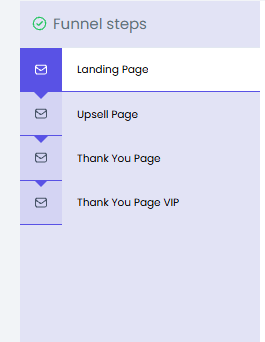
02 FunnelFour steps, with a different thank-you page for free and paying sign-ups. 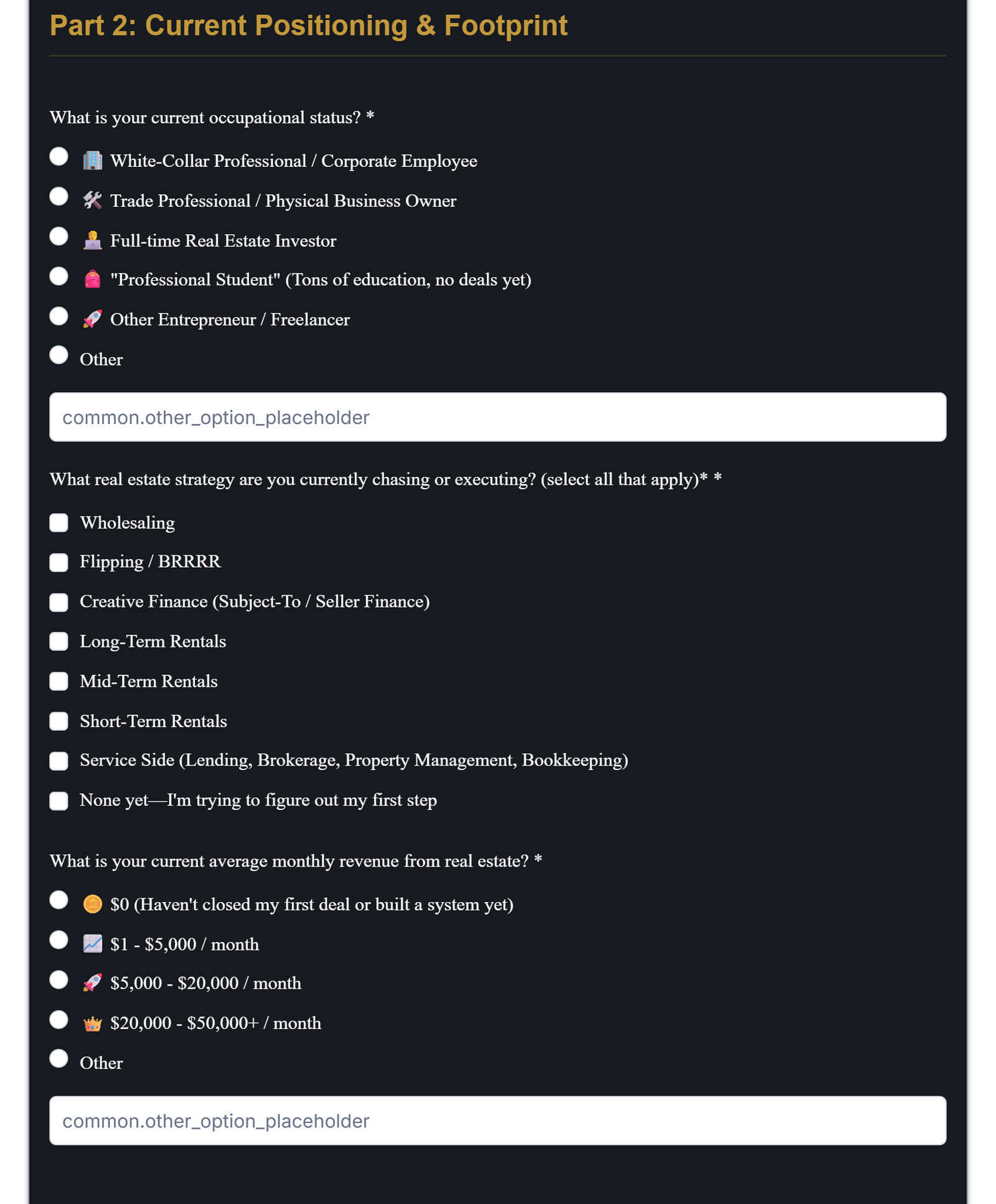
02 FunnelA short form sorts sign-ups by what they do and earn, so the sales calls go to the right people. 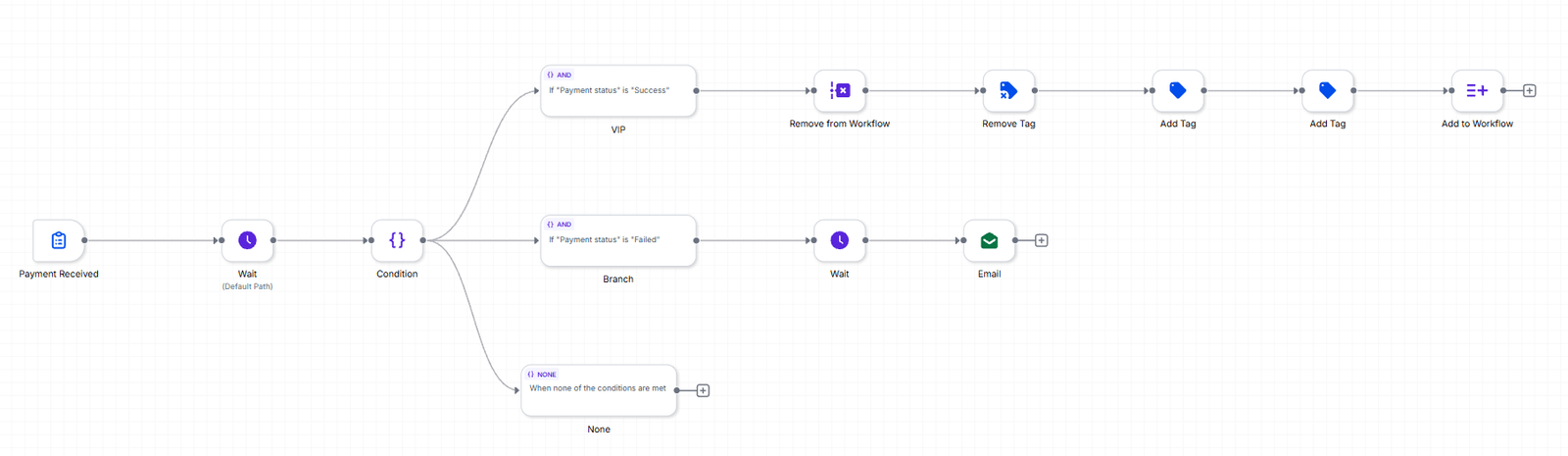
03 AutomationsFor paid tickets, it checks the payment actually went through. A declined card gets a follow-up email instead of counting as a sale. 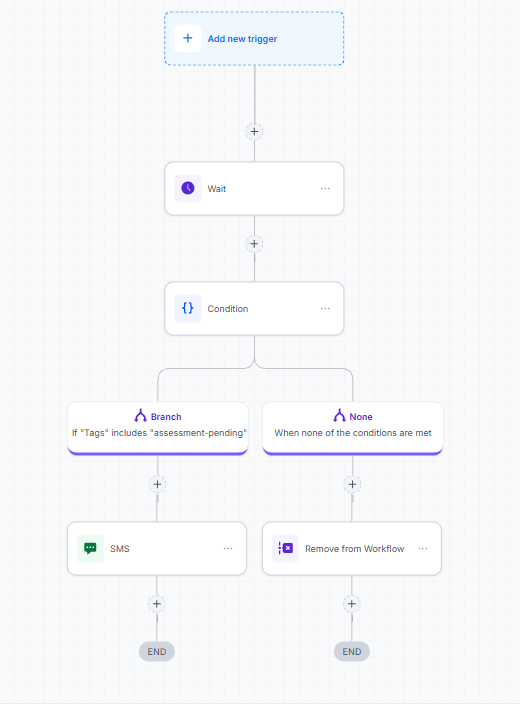
03 AutomationsReminders to fill in the form stop on event day. The host reads the answers beforehand, so a late one can’t help. 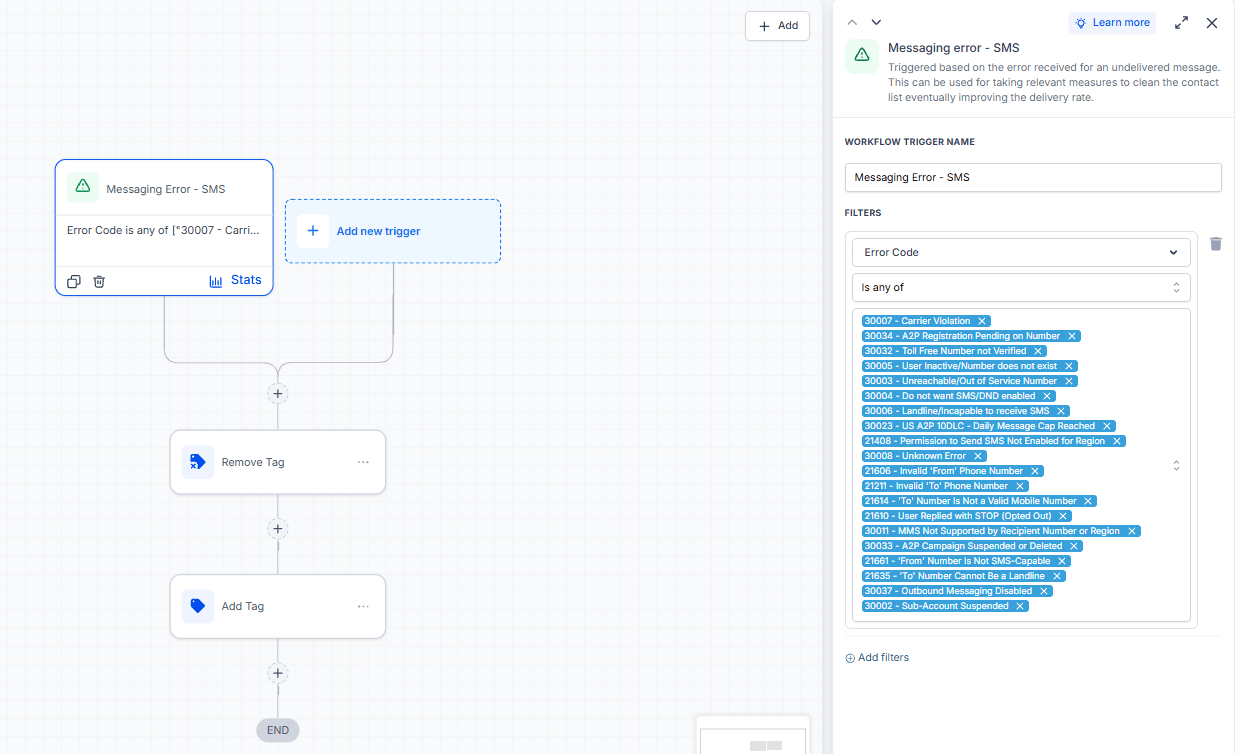
03 AutomationsThe part nobody sees: twenty ways a text can fail, each caught and handled, including three that mean the texting registration itself has a problem. 
04 OngoingAfter the launch, the weekly reminders: tagged members go into a loop that waits for the right day and checks whether it’s the third week of the month. ProblemThe business wanted an event funnel that could take sign-ups, text people about the event and take payment. Building the pages is the quick part. In the US, a business has to be registered with the phone carriers before it can text customers, and unregistered texts show no error: they just quietly fail to arrive for some people. The domain, the email setup and what happens to failed messages can break a launch just as quietly. And once it was running, someone was still texting reminders for the community’s two recurring events by hand, two to three hours every week.
SystemBuilt in the order it has to happen. First the approvals: carrier registration for texting (A2P 10DLC) and the email settings that keep messages out of spam. Then the business’s own domain, so pages, links and replies all run on it. Then the CRM with a four-stage pipeline, the funnel with a thank-you page for each ticket type, and a short form that sorts sign-ups before anyone gets on a call. Finally, twenty-one automations. One group runs the event. The other removes anyone whose messages bounce, who complains or who opts out, so they drop out of every follow-up at once. After launch, the event reminders run on their own: members are tagged, and every Wednesday the account checks whether it’s the third week of the month and texts them in batches of 25, so the number stays in good standing.
ResultThe launch went out and it converted: fifty sign-ups in the two weeks around the opening, seventeen of them paying clients. The texting registration was approved first time, in about three weeks. Twenty kinds of message failure are caught and handled automatically, so the contact list keeps itself clean instead of slowly going bad. The weekly reminders send themselves, and because nobody picks recipients by hand, the wrong person can’t get the text.
-
SYS.06
Company workspace, rebuilt from spreadsheets
Thirty client spreadsheets became one workspace, and nobody hunts for a client card any more.
30+
Client files migrated off spreadsheets in two weeks
measured
- Notion
- ClickUp
- Drive
25 → 8
Tabs in one client’s file, replaced by eight linked databases
measured
1
Places to look for any client’s record, down from one folder each
measured
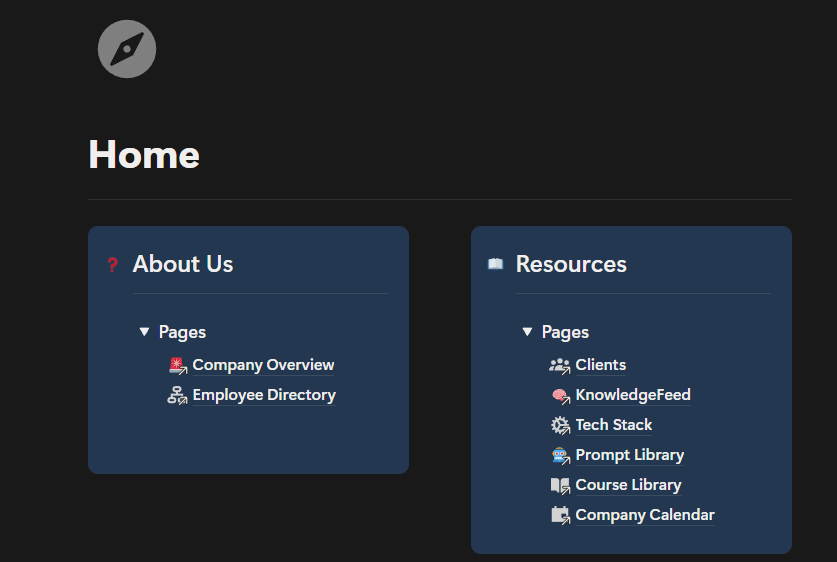
The home page: where a new starter lands and can see everything that exists. 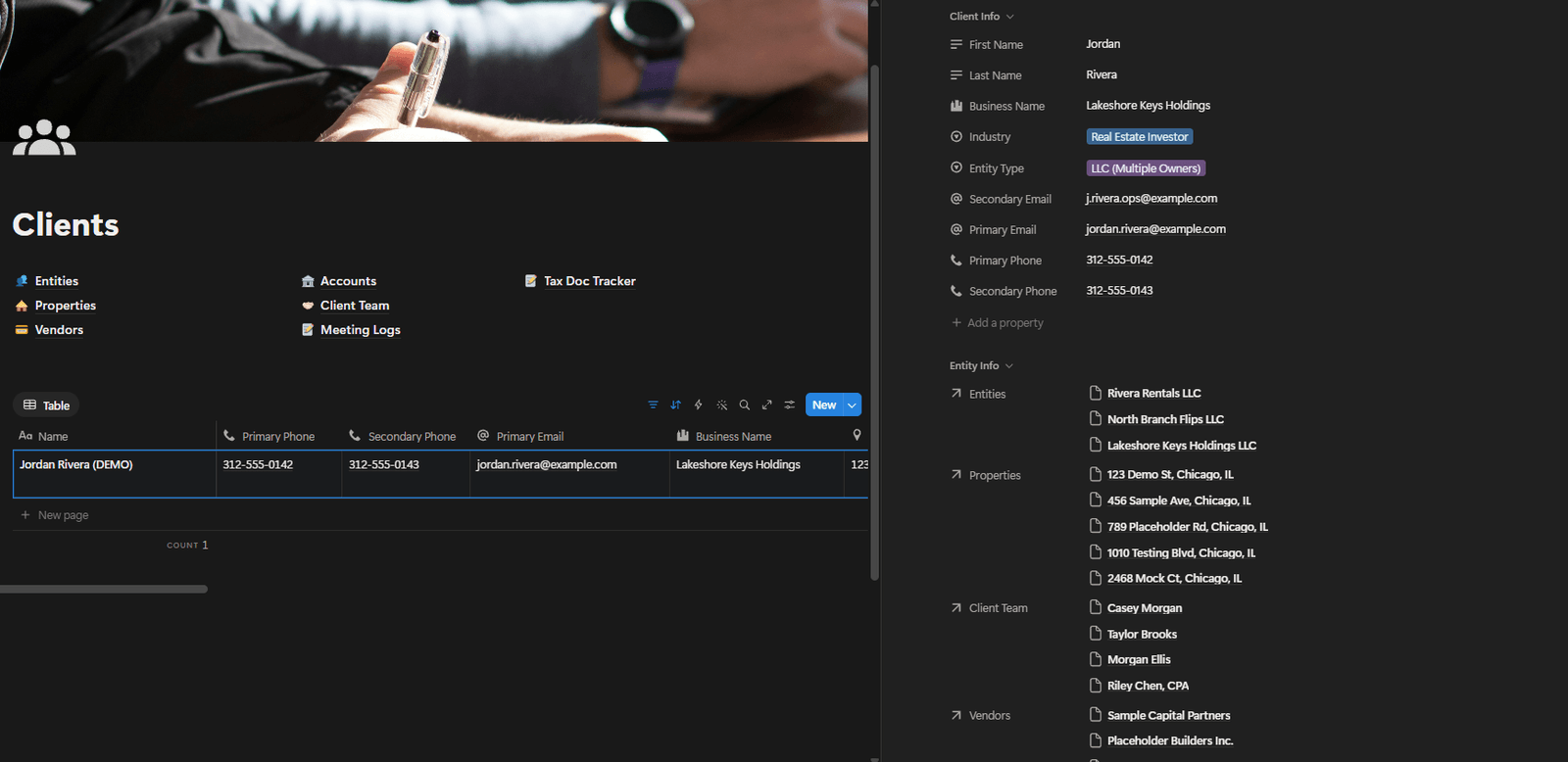
Every client in one list, instead of hunting through folders. New clients from the onboarding form land here automatically. 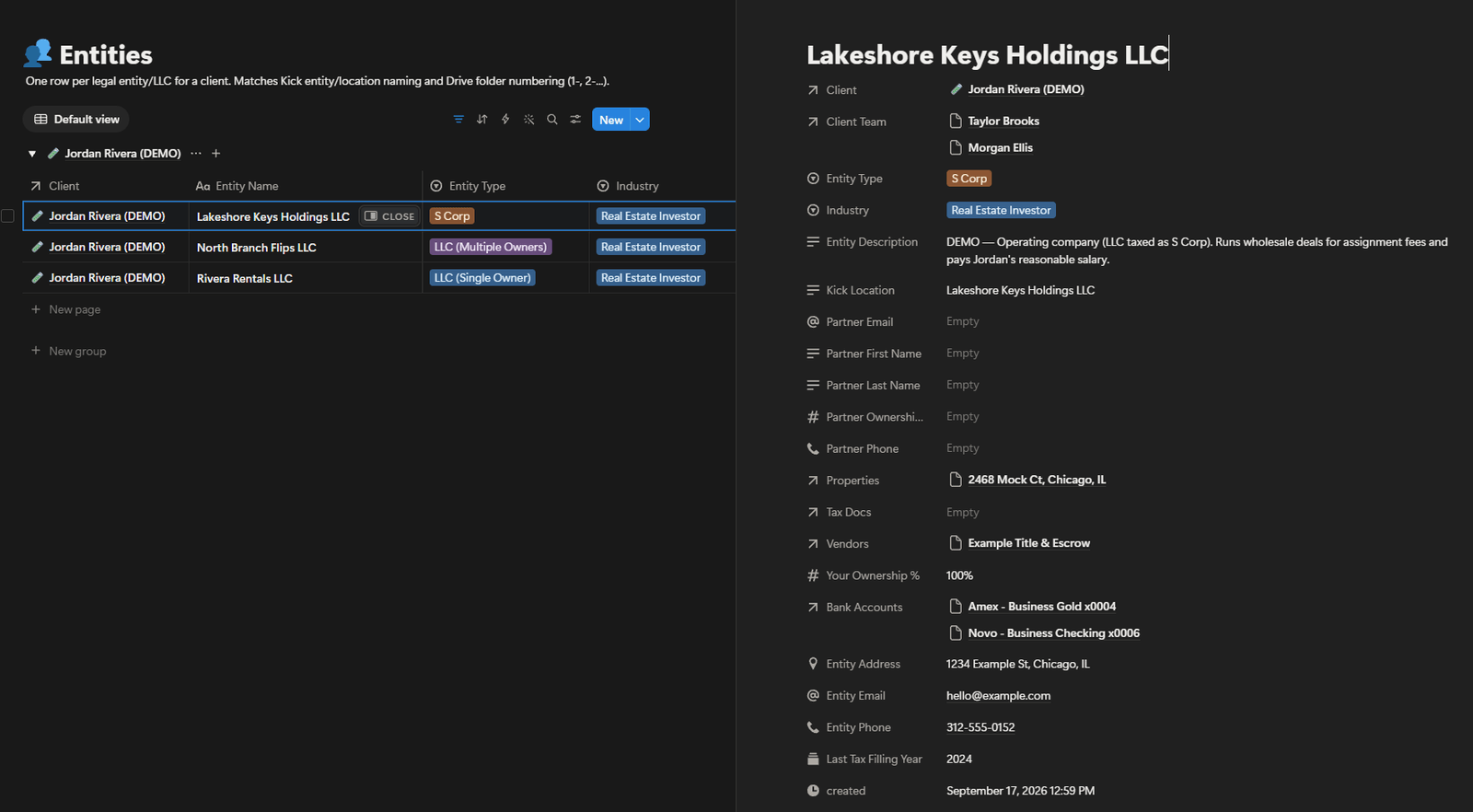
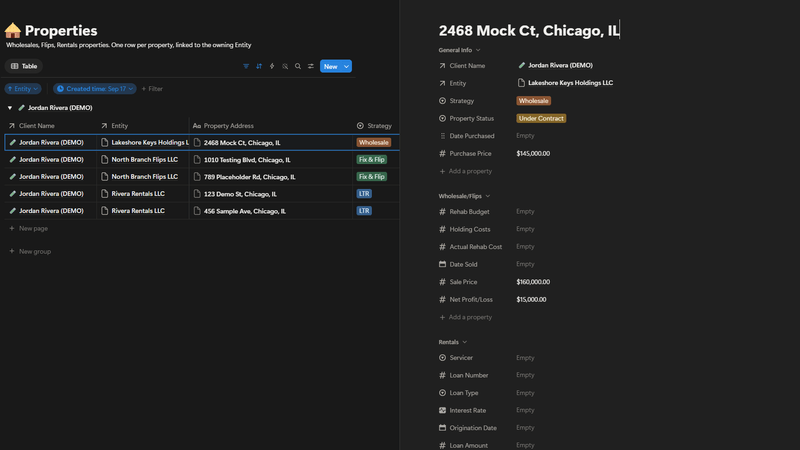
Each company has the same name here as in the bookkeeping software and Drive, so it’s easy to find everywhere. 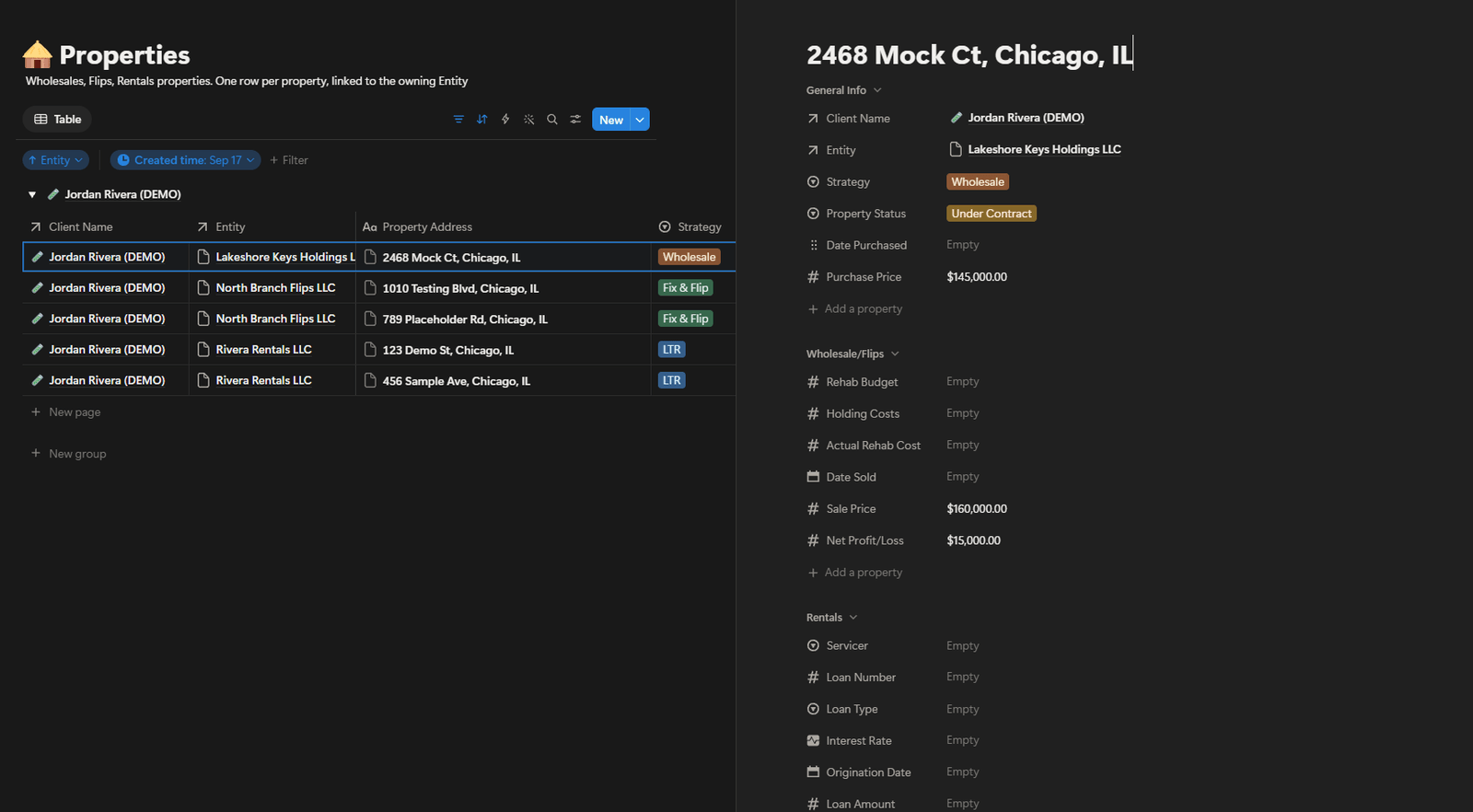
The links are kept by the system, so they stay correct from either side, which loose spreadsheet tabs couldn’t do. 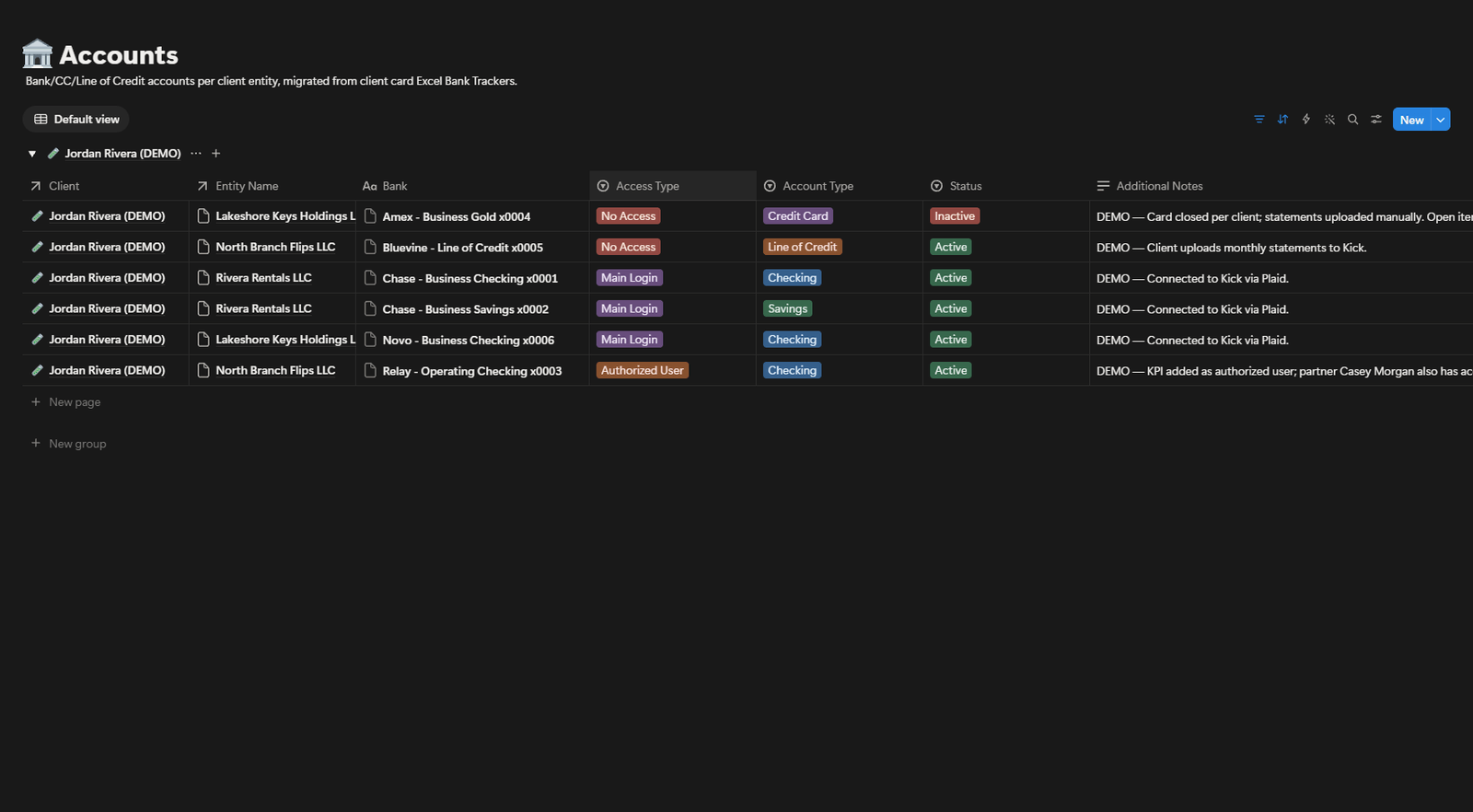
For each account: main login, limited access, or none. Knowing this stops clients being asked twice for access. 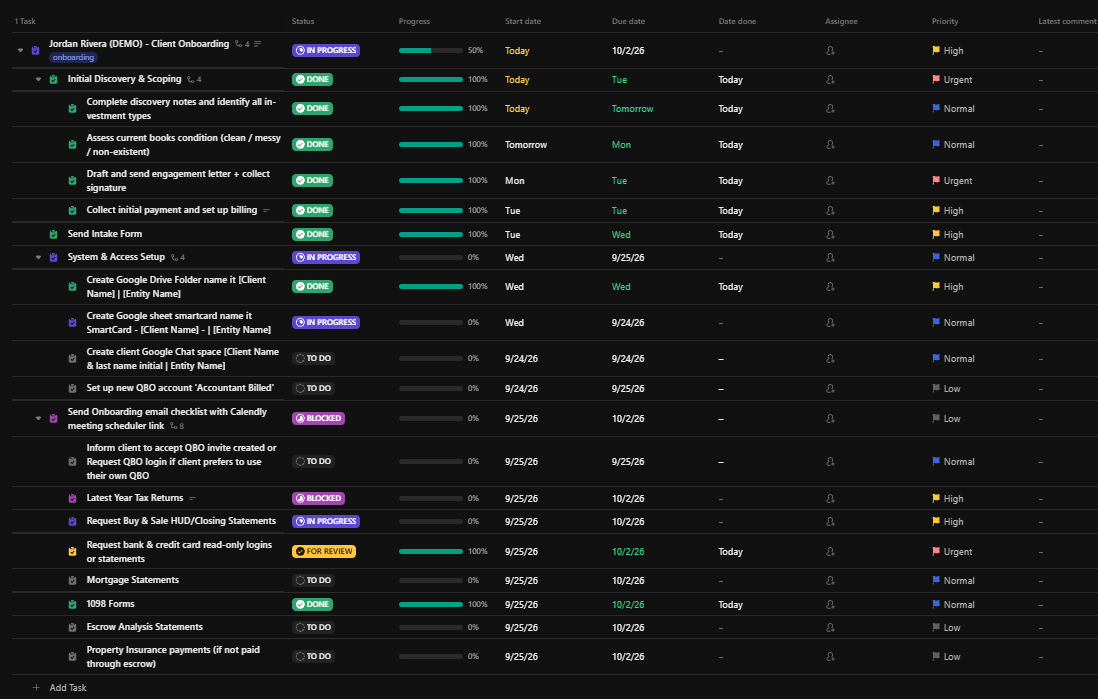
Client work is tracked on a board, so anyone can see where things stand without asking. ProblemEvery client had their own spreadsheet in their own folder, around twenty-five tabs of trackers, checklists and personal notes, with no two set up the same way. Finding one client’s bank details meant knowing which folder, file and tab to open, and only the longest-serving staff knew. New starters couldn’t work on their own, clients were asked again for access they’d already given, and document requests went to the client instead of the assistant who already had them.
SystemOne shared workspace, with a home page and a client database. Each client has one record, and their companies, properties, bank accounts, vendors, team and meeting history are all linked to it, so you can start from a property and find its company and client, or the other way round. Company names match the bookkeeping software and the Drive folders. For each account, it records whether the team has the main login, limited access or none. The client’s own staff are listed separately, with who handles what. Thirty-plus files were moved over in two weeks: by hand at first, then with a custom tool.
ResultOne place to look, with every answer attached to the right client. Twenty people use it, and new starters no longer learn how each spreadsheet was organised, because every client is set up the same way. There’s no time-saved figure here: the real cost was interruptions and repeat requests, and those can’t be timed with a stopwatch.


03 // Field reports
What clients say
Client report // 34 sec, sound on
“John clearly understands the vision. He follows directions, he’s creative, he can think outside of the box. He gets it done.”
Grace P
Real Estate BFF

04 // About the operator
Operations experience, upgraded with intelligent systems.
I’m John Lozada, an operations and technology specialist based in Cebu. Over 11+ years, I’ve learned where teams lose time, where handoffs break, and where small errors become expensive. That includes four years as Operations & Technology Specialist at KPI Advisors, and nearly two in online-banking tech support at JPMorgan Chase.
Today I combine that operational judgment with AI agents, APIs, n8n, GoHighLevel, and connected business systems. I build automation that knows when to act, when to route, and when to stop and ask a human.
- Primary mode
- Systems architect
- Operating principle
- Automate with guardrails
05 // Common questions
What clients ask before booking
Do I have to switch to new tools?
Usually not. I build on the tools you already pay for, and only suggest a change when one of them can’t do the job.
What happens on the free call?
You bring the process that’s eating your week, and you leave with a map of what can be automated, what it takes to build, and what it’s worth. It takes 30 minutes, with no obligation.
How long does a project take?
It depends on scope. A single workflow is quicker than a full GoHighLevel build, and the workspace rebuild in the project archive took two weeks. You get a timeline on the call, before any work starts.
Who owns what you build?
You do. Everything is built inside your own accounts, and my access can be removed when the project ends.
What happens after launch?
You get a written SOP so your team knows how the system runs, and 14 days in which anything that doesn’t work as agreed is fixed at no cost. After that, changes and ongoing support are available as paid work.
06 // Contact channel
Booking open // Free 30-min call
Ready to get your week back?
Bring the process that’s eating your week and you’ll leave with a map of what can be automated, what it takes to build, and what it’s worth.
Live calendar // pick any open slot